Create an indicator
Create and modify an indicator
Create and modify the inficator by clicking on the « + » button
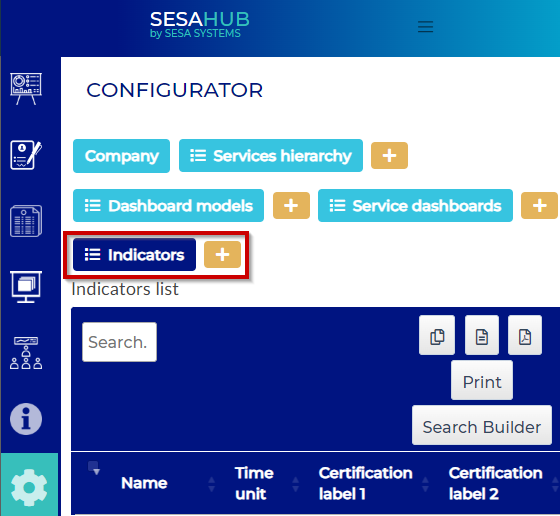
Then
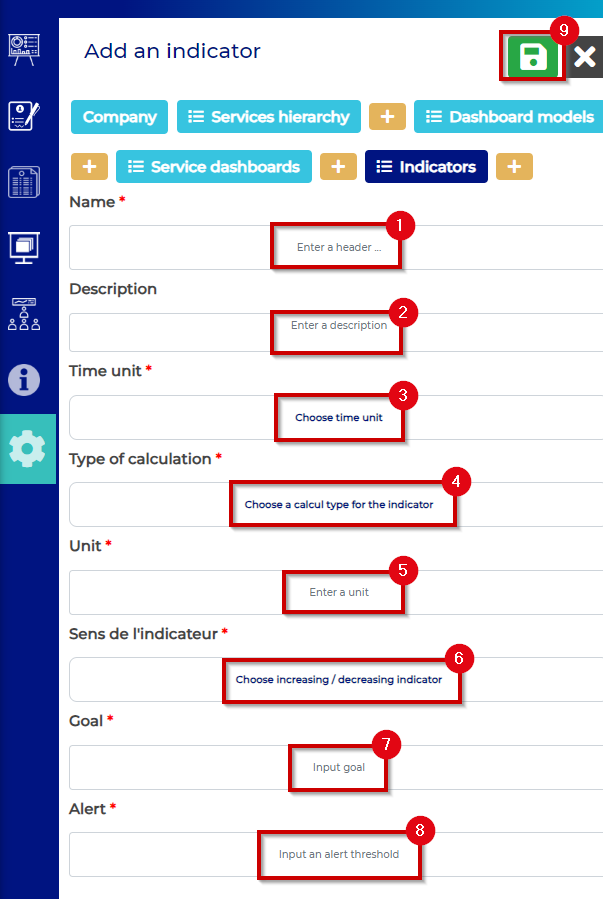
- : Name the indicator
- : Descript the indicator
- : Reporting frequency
Available choices are :
- Daily
- Weekly
- Monthly
- Annualy
- : Calcul type to apply on the indicator
Available choices are :
- Value 1
- Value 1 in %
- Turnover, delays, rejects... (Value2/Value1)
- Proportional (Value 1/Value 2)
- Sum (value 1 + Value 2)
- Difference (Value 1-Value 2 )
-
: Reporting unit
Indicator unit has to be written here -
: Indicator direction
Available choices are :
- Increasing
- decreasing
-
: Goal :
Input the goal value -
: Alert
Input an alert threshold -
: Save the indicator
The indicator is ready-to-use